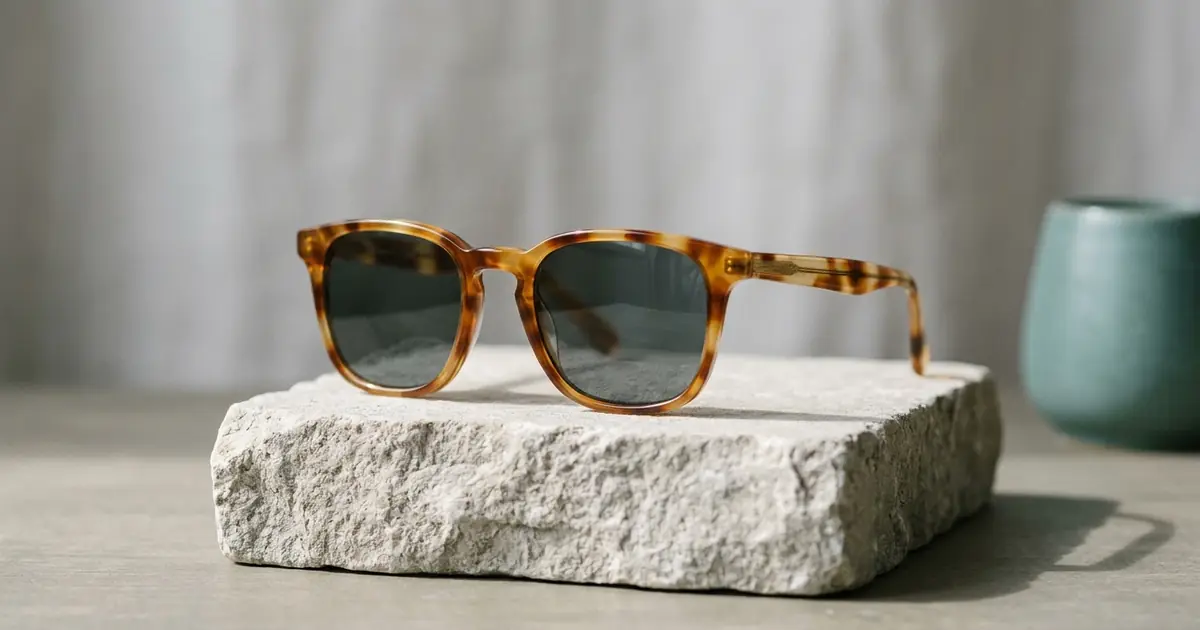
The best AI product photography tool for eyewear, sunglasses and glasses depends on which photo the listing lacks: the frame on a face, the frame alone on white, a scene or a close-up. Photoroom, the best-known editor, names eyewear among the fashion items its AI virtual models wear and adds cutouts, staging and batch editing, from $7.50 a month billed yearly. For the whole set from one photo of a frame, Photta’s Eyewear Studio has an On-Model mode and a Product Only mode, from $19 a month or a $12 one-time pack. Ten more tools show eyewear on their own pages: Caspa AI, Rawshot, Modelia, EcomShot, PixelPanda, LightX, GenerateProductPhotos, Apiway, Scalio and Claid. Every fact here was read on the vendors’ own pages on 20 November 2026.
Photoroom is listed first and Photta second; the order of the others is not a ranking. Nothing was tested hands-on.
Photoroom vs Photta for eyewear, sunglasses and glasses product photos
| Tool | Best for | Eyewear shots its pages show | Starts from | Free start |
|---|---|---|---|---|
| Photoroom | Editing and restaging a whole range in one editor | On AI virtual models; cutouts and staging for any product | $7.50 a month, billed yearly | Free trial on Pro and Max |
| Photta | The full photo set from one photo of a frame | On a face model, on white, in a scene, flat lay, close-up | $19 a month; one-time packs from $12 | Free start on sign-up, no card; watermarked |
| Caspa AI | Front, three-quarter and side views on a model | On white, on a model, outdoor scenes, flat lay, side detail, video | $59 a month, or $39 billed yearly | Not stated; 30-day money-back guarantee |
| Rawshot | Fixed eyes, head and bust frames across a collection | On a model, by frame, pose and light | $9 a month | 7-day trial, 50 credits |
| Modelia | Prompt-controlled models wearing the frames | On a model: e-commerce, lifestyle, editorial | $30 a month | 50 welcome credits, watermarked |
| EcomShot | Low-cost white-background and scene shots | On white, beach scene, premium surface, editorial | $12 a month, or $10 billed yearly | 5 credits, no card |
| PixelPanda | Many images on a small budget | On white, on a model, 12 scene templates | $7 a month | Not stated for photos |
| LightX | Phone-first scene backgrounds | Scene backgrounds from presets or a prompt | ₹999 a month, or ₹4,900 a year | 6 free AI credits a day |
| GenerateProductPhotos | Paying per pack with no subscription | On white, detail views, lifestyle scenes | $2.45 for 5 credits | Not stated |
| Apiway | Frames placed on photos of real models | On a real model photo, side profile, pure white, lifestyle | $19.99 a month | 100 one-time credits |
| Scalio | Shops that also want social posts made | Studio, on-model, flat lay and lifestyle examples | US$29.99 a month | Not stated |
| Claid | Fixing glare on existing eyewear photos | Glare removal on lenses | $9 a month as displayed | 50 credits |
Eyewear product photos and glasses try-on widgets are two different tools
A product photo is a finished image a seller uploads to a listing: the frame on a face, on white, in a scene or in close-up. A try-on widget is software on the product page that lets each shopper see frames on their own face through a camera or an uploaded selfie. This list covers the first kind. For the second, see our list of glasses virtual try-on tools.
Vendors use “try-on” for both. Apiway’s eyewear guide draws the same line: an AR widget on the product page is one product, and on-face imagery for a listing or an ad is another.
Neither replaces sizing. Photta’s Eyewear Studio page says the picture is a preview of style, not a fitting, and that fit comes from lens width, bridge and temple length.
The 12 best AI product photography tools for eyewear, sunglasses and glasses
1. Photoroom: eyewear on AI virtual models, inside a general product photo editor
Photoroom is a product photo editor with a background remover, Product Staging, Batch and an AI fashion model generator. Its virtual model page says the generator places “clothing and other fashion items like jewelry, eyewear, and footwear” onto digital models.
- Eyewear shots: On a virtual model, with a chosen model, pose and background, in portrait, landscape or square, at 2K or 4K. Cutouts, backgrounds and staging are described for products in general.
- What happens to the frames: Not stated for eyewear. The background remover works on your own photo; virtual models and staging generate a new image.
- Price: Pro $7.50, Max $20.99 and Ultra $82.50 a month, billed yearly, with 1,000, 3,000 and 10,000 exports a month. 4K images are listed on Ultra. Month-to-month prices were not read.
- Free start: A free trial on Pro and Max; its length is not stated on the pricing page.
- Not for: Sellers who want a workflow built around frames. Eyewear appears on the virtual model page as one of several fashion items; Photoroom’s industry pages cover other categories.
2. Photta: on-model, white-background, scene and close-up eyewear photos from one photo
Photta is an AI product photography studio. Eyewear Studio takes one photo of a pair of glasses or sunglasses and offers two modes: On-Model, which shows the frame on a face model, and Product Only, which makes product shots without a person. Its eyewear product photography page describes the product-only shots.
- Eyewear shots: On a face model chosen by gender, ethnicity, age and face shape; on a white or gradient background; on marble; in lifestyle scenes; as a flat lay; with a floating effect; and as detail close-ups.
- What happens to the frames: The pages do not say whether the frame is kept pixel for pixel or redrawn. They say the AI handles lens glare and that the on-model picture shows style, not fit.
- Price: Starter $19 or $29 a month, Seller $49 or $89, Brand $119, $219 or $369. Plans are watermark-free at 2K; 4K is on Seller and Brand. Without a plan, one-time packs cost $12 or $20 and do not expire. The cost of one eyewear photo is not stated.
- Free start: A free start on sign-up, no card. Free photos carry a watermark until the first purchase.
- Not for: Sellers who need a fitting tool. The page says to use the size numbers on the frame for fit.
3. Caspa AI: sunglasses and glasses photos with front, three-quarter and side views
Caspa AI has an eyewear photography page for sunglasses and glasses. It lists six kinds of shot from one photo of the frames.
- Eyewear shots: On white, on a model from the front, three-quarter and side, in outdoor scenes, on models of different ages and ethnicities, as a flat lay with case and cloth, and as a short video.
- What happens to the frames: The page says Caspa is “built to keep your product unchanged”: frame shape, colour, lens tint and logo come from your photo.
- Price: Starter $59 a month or $39 billed yearly (500 credits, images only), Growth $99 or $66 (1,000 credits, with video), Scale $249 or $166 (2,500 credits, API access). Credits per image are not stated.
- Free start: Not stated. New subscriptions have a 30-day money-back guarantee.
- Not for: Sellers who want product video on the lowest plan; video starts at Growth.
4. Rawshot: sunglasses and eyewear on a model with fixed frames and light
Rawshot is an AI fashion photography generator with an eyewear page. You upload the real product, then pick model, frame, view, pose, background and a named light direction from menus.
- Eyewear shots: On a model, in Eyes, Head and Bust framing, with library or private models and repeatable lighting.
- What happens to the frames: The page says you start from your real item and keep product fidelity, and also that you cannot verify physical wearability and that upload quality sets the available detail.
- Price: $9 a month (16 images), $39 (80), $89 (192) and $179 (400). The vendor lists $0.56 down to $0.45 an image.
- Free start: A 7-day trial with 50 credits, enough for 10 images.
- Not for: Sellers who only need the frame alone on white; the eyewear page is about on-model compositions.
5. Modelia: prompt-controlled models wearing your glasses or sunglasses
Modelia’s Glasses on Model tool creates images of models wearing eyewear from a single product photo of sunglasses or optical glasses. You describe the styling, pick or create a model, then set background, pose and photo style by prompt.
- Eyewear shots: On a model, as e-commerce, lifestyle or editorial images, on different faces and looks.
- What happens to the frames: Not stated on the page read.
- Price: Creator $30 a month for 150 credits, Atelier $109 and Brand $385. A standard image costs 3 credits, so 150 credits make about 50 images, or about $0.60 each by our arithmetic.
- Free start: The Starter plan is free: 50 welcome credits, then 20 a month, up to 2K with a Modelia watermark.
- Not for: Sellers who want product-only shots; this tool’s page covers eyewear worn by a model.
6. EcomShot: white-background and scene photos of sunglasses and eyewear
EcomShot has a sunglasses and eyewear category page. You pick a preset background or describe a scene.
- Eyewear shots: On a clean white background, a summer beach scene, a premium polished surface and a fashion editorial composition. AI Model Photography is on paid plans.
- What happens to the frames: The page says the AI creates controlled lens reflections that keep the frames visible. Whether the frame is kept or redrawn is not stated.
- Price: Starter $12 a month or $10 billed yearly (60 credits: 60 product photos or 30 model photos, 2K), Creator $29 or $24 (200 credits, 4K), Pro $59 or $49 (600 credits). That is about $0.10 to $0.20 a product photo on monthly billing, by our arithmetic.
- Free start: 5 credits on sign-up, no card.
- Not for: Sellers who want on-model photos on the free plan; model photography is listed on paid plans.
7. PixelPanda: low-cost white-background and on-model photos of glasses and sunglasses
PixelPanda’s eyewear page describes turning one pair of glasses or sunglasses into white-background shots, on-model looks and template scenes.
- Eyewear shots: On white for marketplaces, on a model’s face, and in 12 scene templates such as beach, urban and studio.
- What happens to the frames: The page says it preserves the true colours and finish of frames and lenses while cleaning up background and lighting.
- Price: Lite $7 a month for 100 credits, Starter $24 a month for 1,125, or $7.99 a week for 280. A product photo is 1 credit, about $0.02 to $0.07 by our arithmetic.
- Free start: Not stated for product photos. The eyewear page mentions free tools.
- Not for: Sellers who want to pay once with no subscription; the pricing page lists only monthly and weekly plans.
8. LightX: scene backgrounds for glasses, sunglasses and optical frames
LightX is a photo editor with a web and phone app. On its AI eyewear photography page you upload a phone photo, then choose a preset background or write a prompt.
- Eyewear shots: Scene backgrounds: a beach for sunglasses, a work or study scene for blue-light glasses. The page also mentions using prescription glasses on models.
- What happens to the frames: The page’s FAQ says the tool keeps the eyewear’s shape, logo, colour and frame design intact while changing the background.
- Price: Pro is ₹999 a month, or ₹4,900 billed yearly, with 1,000 AI credits a month and up to 500 images. A one-time pack of 400 AI credits costs ₹499.
- Free start: The free Starter plan lists 6 daily AI credits (the eyewear page says 5) and a 512px export.
- Not for: Sellers who need full-size files for free; 4096px export is on Pro.
9. GenerateProductPhotos: pay-per-pack sunglasses and eyewear photos with no subscription
GenerateProductPhotos has a sunglasses and eyewear page. You upload a reference photo, choose views and an aspect ratio, and review the set.
- Eyewear shots: White-background images, detail views and lifestyle scenes, including summer and urban settings.
- What happens to the frames: Your photo is used as a reference. The page says AI can change small details and tells you to check frame shape, hinges, lens tint and logos on every output.
- Price: Credit packs start at $2.45 for 5 credits. A 1K image uses 1 credit and a 2K image 2 credits, about $0.49 a 1K image at the smallest pack by our arithmetic. No subscription is needed.
- Free start: Not stated on the page read.
- Not for: Sellers who want claims about lenses in the image; the page says not to infer UV protection or optical performance from generated images.
10. Apiway: glasses and sunglasses placed on photos of real models
Apiway is a platform of AI apps with a guide to eyewear photography. For on-face shots it uses photo sets taken of real models: you upload the frame, and the AI places it on the existing photograph. A studio template puts the frame alone on pure white.
- Eyewear shots: Front on-face, side profile, frame only on pure white, and lifestyle sets filtered by environment.
- What happens to the frames: The guide says the model’s face stays exact and only the frame is new.
- Price: Starter $19.99 a month for 2,000 credits, rising to Scale at $799.99. A credit costs $0.01; the credits per image depend on the app and are shown in the interface.
- Free start: The pricing page lists 100 one-time credits on the free plan; the eyewear guide says 150.
- Not for: Stores looking for an AR widget; the guide says Apiway makes imagery and points those brands to AR vendors.
11. Scalio: sunglasses and eyewear photoshoots inside a social media tool
Scalio is a marketing app for small businesses with social posts, reels and product photoshoots. Its sunglasses and eyewear page says you can upload a photo of your actual sunglasses to get its example shots with your product.
- Eyewear shots: The examples cover studio close-ups, on-model editorial, flat lays and lifestyle scenes.
- What happens to the frames: Not stated beyond the page’s line that the shots are made “with your real product in them”.
- Price: Starter US$29.99 a month with 60 creative credits and Professional US$49.99 with 200. Credits per photo are not stated.
- Free start: Not stated on the pricing page.
- Not for: Sellers who want only a photo tool; both plans are built around social media posting.
12. Claid: glare removal for eyewear photos, with AI scenes for products
Claid is an AI product photo suite and API. Its remove-glare page names eyewear among “glare magnets” and describes AI Edit prompts for removing glare from lenses.
- Eyewear shots: Your existing photo with lens glare reduced, exported at up to 4K.
- What happens to the frames: A suggested prompt asks the AI to “keep the lens tint and frame shape the same”.
- Price: The pricing page displayed Essentials at $9 a month for 500 credits and Pro at $35 for 2,000; whether that is the monthly or the yearly-billing rate was not confirmed. AI Edit and AI Photoshoot use 4 credits each.
- Free start: 50 credits, enough for 12 AI Edit or AI Photoshoot generations.
- Not for: Sellers who need eyewear on a model; the page describes its on-model tool for garments.
Which AI tool for eyewear and sunglasses photos fits your shop
- You need the frame on a face, on white, in a scene and in close-up from one photo: use Photta or Caspa AI.
- You need to clean up and restage photos you already have, across many products: use Photoroom.
- You need a whole collection on the same model, crop and light: use Rawshot.
- You need to steer the model, outfit and background by prompt: use Modelia.
- You need frames on photographs of real people: use Apiway.
- You need the lowest listed cost per image: use PixelPanda or EcomShot.
- You need a few images with no subscription: use GenerateProductPhotos, or a one-time pack from Photta.
- You need glare taken off photos you already shot: use Claid.
- You need photos and social posts from one app: use Scalio.
- You need scene backgrounds made on a phone: use LightX.
FAQ: AI product photography tools for eyewear, sunglasses and glasses
What is the best AI product photography tool for eyewear, sunglasses and glasses?
It depends on the photo you need. Photoroom suits editing and restaging a range and shows eyewear on its virtual models, Photta makes on-model, white-background, scene and close-up photos from one photo of a frame, and Caspa AI lists front, three-quarter and side views on a model.
Can AI put sunglasses or glasses on a model from one product photo?
Yes, according to several vendors’ pages. Photta’s On-Model mode, Caspa AI, Rawshot, Modelia and PixelPanda each describe placing a frame on an AI model from one product photo, and Apiway places the frame on a photograph of a real model.
How much do AI eyewear product photos cost?
Monthly plans priced in dollars start between $7 and $59. By our arithmetic from those plans, an image costs about $0.02 to $0.07 at PixelPanda, $0.10 to $0.20 at EcomShot, $0.45 to $0.56 at Rawshot and about $0.60 at Modelia. Without a subscription, GenerateProductPhotos sells 5 credits for $2.45 and Photta sells one-time packs for $12 or $20.
Do AI tools change the frame shape or lens tint of glasses?
They can. GenerateProductPhotos says AI can change small details and asks sellers to check frame shape, hinges, lens tint and logos. Caspa AI and LightX say they keep the frame shape, colour and logo from your photo. Those are vendor claims, so compare each image with the real frame.
How do AI tools handle glare on sunglasses and glasses lenses?
Vendors describe two approaches. Photta, EcomShot and PixelPanda say their generators manage lens reflections when they make the image, and LightX says its tool is trained to adjust glare. Claid instead edits a photo you already have: you write a prompt such as “remove glare” and name the lenses.
Sources for this comparison of eyewear product photography tools
- Photoroom: AI virtual model page, Product Staging page, background remover page, industry page list and pricing page, read on 20 November 2026.
- Photta: Eyewear Studio page, eyewear product photography page, pricing page and llms.txt, read on 20 November 2026.
- Caspa AI: eyewear photography page and pricing page; Rawshot: eyewear solution page and pricing page; Modelia: Glasses on Model page and pricing page, read on 20 November 2026.
- EcomShot: sunglasses category page and pricing page; PixelPanda: eyewear page and pricing page; LightX: AI eyewear photography page and pricing page, read on 20 November 2026.
- GenerateProductPhotos: sunglasses and eyewear page; Apiway: eyewear guide and pricing page; Scalio: sunglasses and eyewear page and pricing page; Claid: remove-glare page and pricing page, read on 20 November 2026.
- Cost per image is our own arithmetic from each vendor’s listed plan prices, unless the vendor states it.
- Nothing was tested hands-on; “not stated” means the pages read did not say.